Last Updated on by Azib Yaqoob
The short version
- The Conversions API isn’t a replacement for the pixel. It’s a second delivery route for the same events.
- You want both, but only if they share an
event_id. Without it, you’ve built a machine for counting sales twice. - The real win from CAPI isn’t “beating ad blockers”. It’s sending better customer data, so Meta can match more sales to the people who saw your ads.
Here’s the simplest way to think about it. Imagine shipping every order with two couriers. One is fast and knows a lot about the customer’s journey, but sometimes gets stopped at the border (that’s the pixel). The other almost always gets through, but arrives with less context (that’s the Conversions API). Send both, give them the same tracking number, and the warehouse counts one parcel with the best information from each.
Leave out the tracking number and the warehouse counts two parcels. That’s the most common way a “proper” Meta setup goes wrong.
Table of Contents
What the pixel does well, and where it fails
The pixel runs in the visitor’s browser. Its big advantage is context: it reads the _fbp browser ID and the _fbc click ID (created when someone lands from an ad with fbclid in the URL). Those two values are some of the strongest signals Meta has for tying a sale to an ad click.
Its weakness is that everything depends on the browser cooperating:
- Ad blockers and privacy browsers block
connect.facebook.net. - Safari limits how long script-set cookies last, so
_fbpand_fbccan expire within days. - Consent banners (correctly) stop it until the visitor agrees.
What the Conversions API adds
CAPI sends the event from a server: your store platform, an app, or a server-side GTM container. Ad blockers can’t touch it. More importantly, the server knows things the browser often doesn’t send, such as the customer’s email, phone and address from the order, which it hashes before sending.
That’s where Event Match Quality comes from. Meta’s score for each event reflects how many customer parameters you send and how well they match. Better matching means more sales attributed, and better optimisation.
What a server doesn’t naturally have is the browser context: the fbp and fbc values, IP address and user agent. A good CAPI setup passes those through from the browser. A lazy one doesn’t, and its server events are much less useful than they look.
Deduplication: the part that decides whether this works
When the same purchase arrives from both the pixel and the server, Meta deduplicates it if two things match:
- the event name (for example
Purchase), and - the event ID:
eventIDon the pixel,event_idon the server.
Meta also needs both to arrive within its deduplication window (48 hours). In practice they arrive seconds apart.
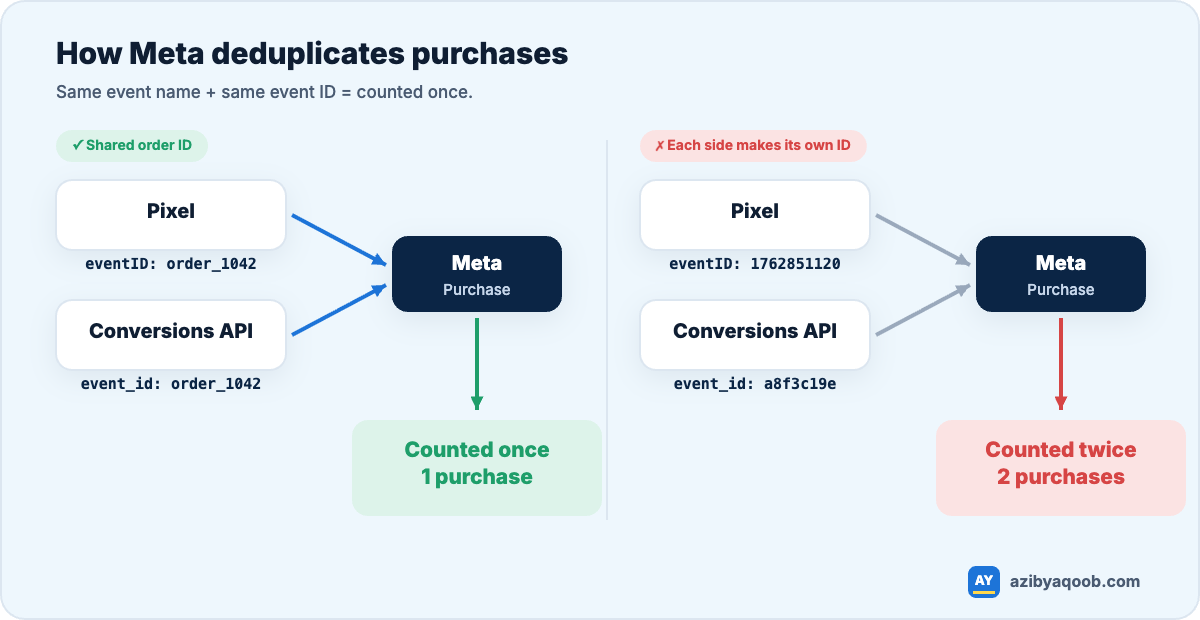
The simplest reliable event ID for purchases is something both sides already know, like the order ID. Here’s what that looks like:
// Browser (pixel) on the order confirmation
fbq('track', 'Purchase',
  { value: 89.00, currency: 'USD' },
  { eventID: 'order_1042' }
);

// Server (Conversions API) for the same order
{
  "event_name": "Purchase",
  "event_id": "order_1042",
  "event_time": 1762851120,
  "action_source": "website",
  "event_source_url": "https://yourstore.com/checkout/thank-you",
  "user_data": {
    "em": ["<sha256 of lowercase email>"],
    "ph": ["<sha256 of phone, digits with country code>"],
    "fbp": "fb.1.1762850000000.123456789",
    "fbc": "fb.1.1762849000000.IwAR...",
    "client_ip_address": "203.0.113.10",
    "client_user_agent": "Mozilla/5.0 ..."
  },
  "custom_data": { "value": 89.00, "currency": "USD" }
}
The mistake to look for first: the browser and the server each generate their own “unique” ID, like a timestamp or a random string. Both are unique, so neither matches the other, and every purchase is counted twice. It looks perfect in each tool on its own and only shows up when you compare Ads Manager with real orders.
How to check your current setup in five minutes
- Open Events Manager, choose your dataset (the new name for a pixel) and click the Purchase event.
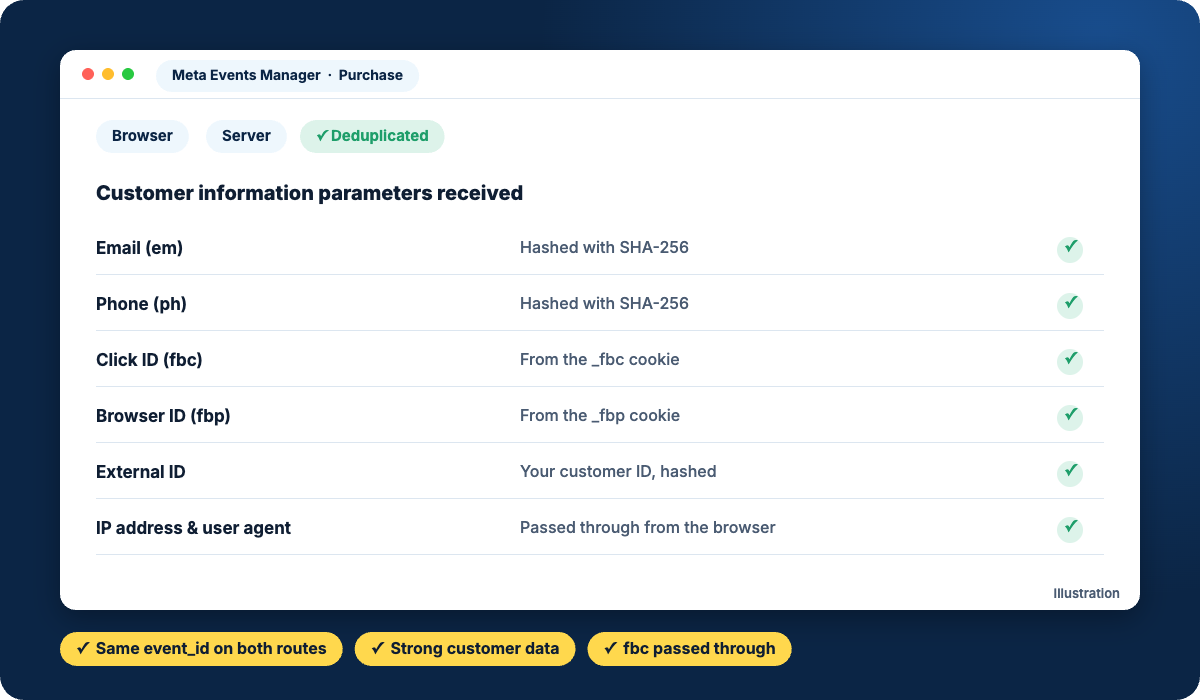
- Look at the connection methods. “Browser” and “Server” both listed is what you want.
- Open the event details and check deduplication. Meta shows whether server events are being matched to browser events. If few are deduplicated, your event IDs don’t line up.
- Check Event Match Quality and which customer parameters are being received. If
fbc, email or phone are missing, that’s your next fix. - Finally, compare a week of Meta purchases (attributed) with your store’s orders. If Meta reports more purchases than you had orders, stop everything and fix deduplication.
Pixel vs Conversions API at a glance
| Meta Pixel | Conversions API | |
|---|---|---|
| Runs in | The visitor’s browser | A server (platform, app or server-side GTM) |
| Blocked by ad blockers | Often | No |
| Best signals | fbp, fbc, browser context | Hashed email, phone, address, order data |
| Setup effort | Low | Medium, depending on platform |
| Main risk | Missing events | Duplicate events without a shared event_id |
Which way to set it up
- Shopify: the Facebook & Instagram app with data sharing set to Maximum handles both routes and deduplication for you. For most stores that’s the right answer. Don’t add a second CAPI app on top of it; that’s how duplicates start. If the app won’t connect, see Meta Pixel not connecting to Shopify.
- WooCommerce: Meta’s official plugin, or a well-maintained tracking plugin that sends both routes with a shared ID. Test deduplication yourself; don’t assume it.
- Server-side GTM: the most control. You can enrich events, set first-party cookies that last longer in Safari, and send the same data to GA4 and Google Ads. Worth it once ads are a serious part of your revenue. See Stape vs Google Cloud for hosting.
Do you need CAPI if you spend very little?
Honestly, if you spend a few hundred dollars a month on Meta, a clean pixel setup is fine to start with. The data you’re losing costs less than the setup. Once Meta becomes a real sales channel, the maths flips quickly, and a broken setup becomes far more expensive than a correct one.
Want this checked properly? I set up Meta Pixel and Conversions API with matching event IDs and strong customer data for Shopify and WooCommerce. See Meta Conversions API setup or ask for a free tracking check.