Last Updated on by Azib Yaqoob
The short version
- Your server-side GTM container is the same either way. Stape and Google Cloud are just where it runs, and you can move later.
- At small and mid-size store traffic, Stape is usually much cheaper, because Google Cloud has a fixed floor of roughly $100–150 a month for a proper production setup.
- Google Cloud makes sense when you’re big enough that the floor stops mattering, or when your company already lives on Google Cloud.
Most comparisons of Stape and Google Cloud read like feature checklists. The decision is simpler than that. It comes down to one question: how many requests will your container handle each month, and who is going to look after it?
Let’s work through both.
Table of Contents
First, estimate your requests
Every hit your website sends to the server container counts as a request: page views, product views, add-to-carts, purchases. A quick estimate:
monthly sessions × events per session = monthly requests
A typical store sends around 5–8 events per session once e-commerce tracking is set up properly. So a store with 30,000 sessions a month is looking at roughly 150,000–250,000 requests. A store with 300,000 sessions is in the millions.
That number decides most of what follows.
What each option really costs
Stape charges by plan, based on requests. At the time of writing:
- Free: up to 10,000 requests a month (testing only)
- Pro: about $17/month billed yearly, up to 500,000 requests
- Business: about $83/month billed yearly, up to 5 million requests
- Enterprise: about $167/month billed yearly, up to 20 million requests
Google Cloud (Cloud Run) charges for the servers running your container. Google’s own estimate is about $50 per server per month. A production setup shouldn’t run on a single server, because if it restarts you lose data, so most setups keep at least two or three running. That puts the floor at roughly $100–150 a month before traffic grows.
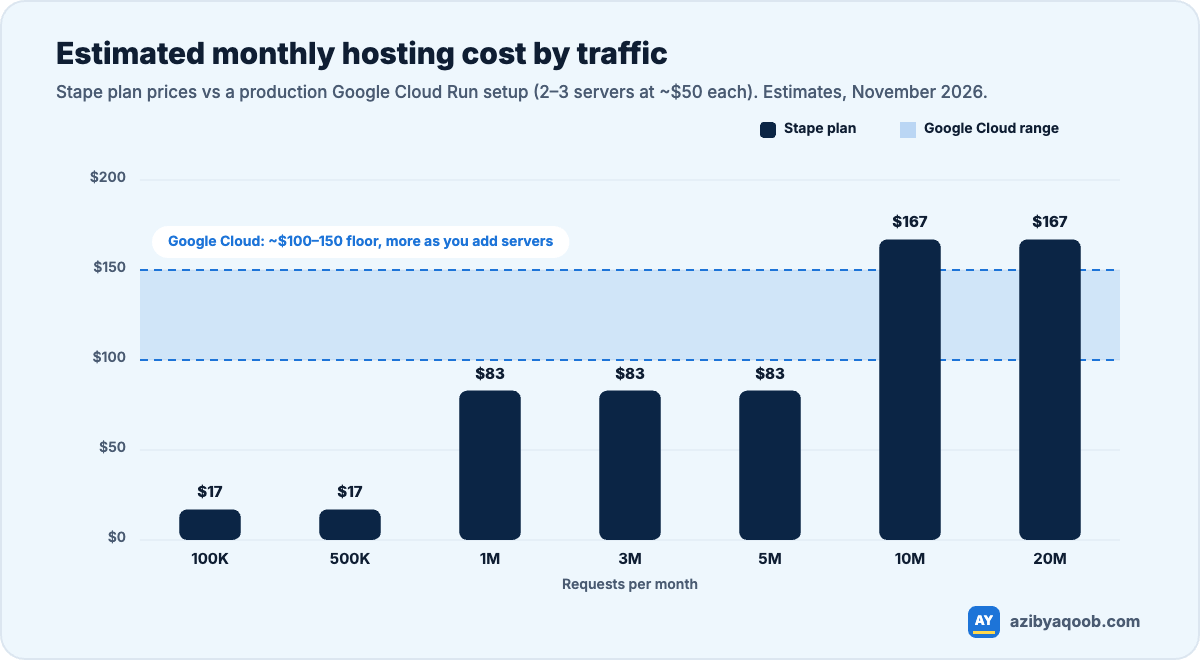
The chart makes the trade-off obvious. Below a few million requests a month, Stape is cheaper, often by a lot. Google Cloud’s cost is driven by servers, not requests, so it only becomes competitive at high volume.
Hidden cost to watch on Google Cloud: Cloud Logging. By default every request to your container can be logged, and at high volume those logs cost real money. Turn off or exclude request logging for the tagging server unless you actually use it. It’s worth checking first in any existing Google Cloud setup.
Setup and maintenance
Stape is built for this one job. You create a server container in GTM, paste its config into Stape, point a subdomain like data.yourstore.com at it, and you’re running. Updates, scaling and uptime are handled for you.
Google Cloud gives you full control, which also means full responsibility. GTM can create the Cloud Run service for you, but you’ll manage:
- minimum and maximum instances (too low and you lose data under load)
- the separate preview server used for debugging
- custom domain mapping and SSL
- logging, monitoring and billing alerts
- updating the tagging server image when Google releases new versions
None of that is hard for someone who knows Google Cloud. All of it is easy to get wrong for someone who doesn’t, and the failure mode is quiet: tracking keeps “working” while dropping events under load.
Features that actually matter for a store
- First-party domain: both support it, and it’s the main reason to go server-side in the first place. Cookies set by your own server last much longer in Safari than cookies set by scripts.
- Platform connectors: Stape has ready-made apps and plugins for Shopify and WooCommerce that feed data into your container, plus its own tags. On Google Cloud you’ll rely on community templates or build more yourself.
- Script loading through your own domain: Stape’s custom loader serves GTM and GA4 scripts from your domain, which helps when blockers target Google’s. You can achieve similar results on Google Cloud, but it’s extra work.
- Data location and integrations: Google Cloud lets you pick exact regions and connect directly to BigQuery and the rest of your cloud setup. If you have strict data-residency rules or a data team on Google Cloud, this matters.
One thing server-side doesn’t do
Server-side tracking doesn’t bypass consent, and it shouldn’t. If a visitor declines tracking, your server container should respect that. Anyone selling server-side as a way to “track everyone regardless” is setting you up for a privacy problem, especially in the EU and UK.
How to decide
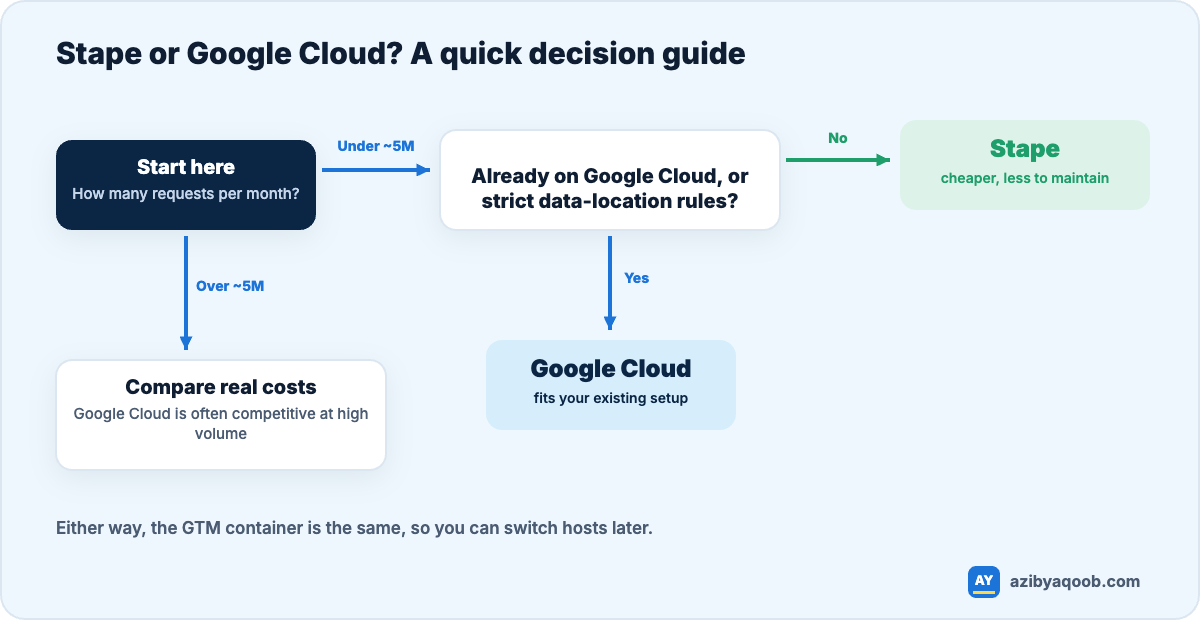
For most Shopify and WooCommerce stores, I’d recommend starting on Stape. It’s cheaper at that scale, faster to launch and one less thing to maintain. Because the container lives in GTM, moving to Google Cloud later is mostly a matter of pointing your tracking subdomain at the new host. Your tags, triggers and variables stay the same.
If you’re unsure whether you need server-side tracking at all, start with what server-side tracking does and when it’s worth it, and read Meta Pixel vs Conversions API if Meta is your main ad channel.
Want an honest recommendation? I set up server-side GTM on Stape or Google Cloud, with your own tracking domain, and I’ll tell you if you don’t need it yet. See server-side tracking or ask for a free tracking check.